
Register alternate delivery addresses
You can save alternate addresses to organize your deliveries according to your needs.
Once you have logged in (see HERE), click either :
- On the cogwheel in the top right-hand corner, Click on “MY ACCOUNT” button, then on the ‘ADDRESS’ tab.


- On ‘MY ACCOUNT’ at the bottom of the page, then on the ‘ADDRESS’ tab.


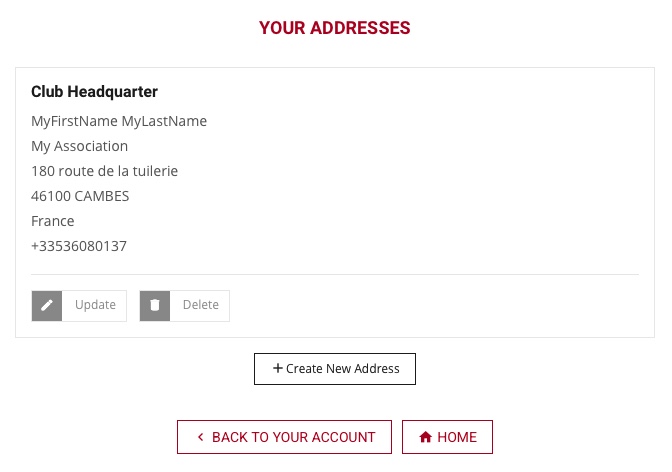
You can then add a new address by clicking on “CREATE NEW ADDRESS”.
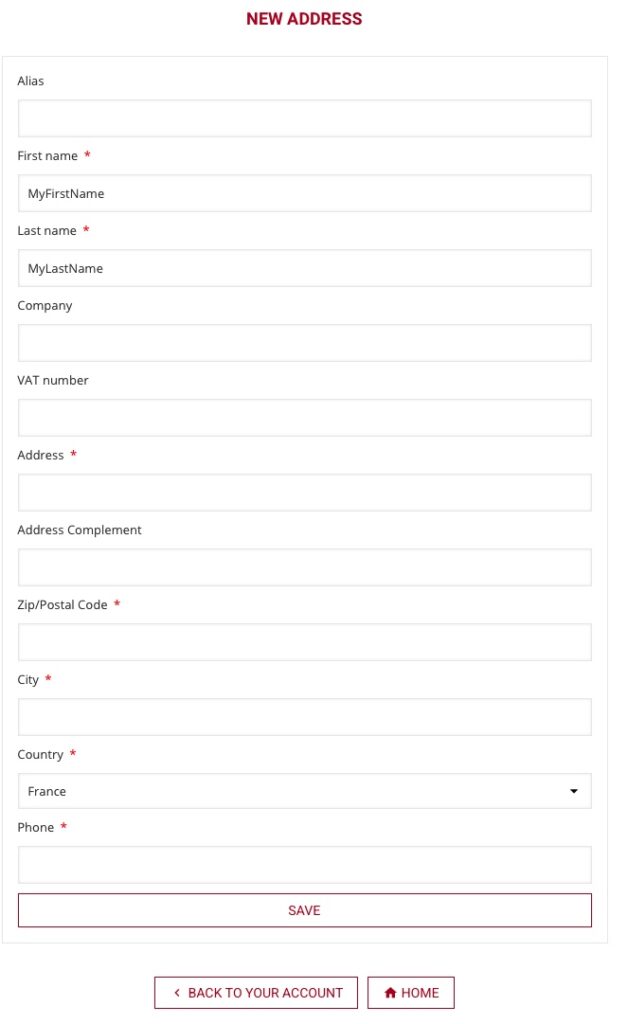
- ALIAS
The alias is the name for your delivery, you can write a city, a name… to recognize it easily in the address list - FIRST and LAST NAME
The first and last names are mandatory, this must be the name of the individual who will receive the package.
PROTEUSHOP won’t be responsible for any failure if the contact name is not correct - COMPANY
If delivery is to a business address (only), you can complete this field. - VAT number
Leave blank - ADDRESS / ZIP CODE / CITY / COUNTRY
Full delivery address
PROTEUSHOP won’t be responsible for delivery failure if the address is not correct - PHONE
Phone number of the person whose name is listed above
The phone number is really important as it can be used by the carrier and the driver of the carrier to update you about the delivery or to contact you about the time or a delivery issue. We recommend registering a mobile phone number to receive text messages.
PROTEUSHOP won’t be responsible for any failure if the phone number is not correct